
 Service

XYZ Format
Jan 22,2026
GISBox is a one-stop 3D GIS data editing, conversion and publishing platform that supports editing in multiple GIS formats such as OSGB/GEOTIFF/RVT, converting to 3DTiles/Terrain and publishing.
Introduction
The XYZ format is one of the most fundamental and widely used point data formats for describing three‑dimensional positional information using X, Y, Z coordinate values. It is typically stored as a text (ASCII) file, with each line representing a single point containing planar coordinates (X, Y) and a height or depth value (Z). Thanks to its simple structure, the XYZ format is utilized across a broad range of fields, including topographic surveying, point‑cloud processing, 3D modeling, GIS, CAD, and remote sensing.

File Structure
The XYZ format has an extremely simple structure and is essentially composed of the following elements:
- X‑coordinate: Represents the east–west or longitude‑oriented position of the point, depending on the coordinate system used (e.g., planar Cartesian, UTM, or geographic longitude).
- Y‑coordinate: Represents the north–south or latitude‑oriented position of the point. Together with the X‑coordinate, it defines the planar location of the point.
- Z‑coordinate: Represents elevation, depth, or any arbitrary scalar value. In terrain data it is commonly used as an elevation value; in point‑cloud data it is often treated as height or depth information.
- Extended attributes (optional): Although not required by the format specification, additional columns such as RGB values, intensity, classification codes, or timestamp information may be appended after the Z value, providing flexible extension based on application needs.
Pros
- Extremely simple and easy to understand: The column‑based layout of XYZ is clear, readable both by humans and machines, and allows intuitive comprehension of the data content.
- High versatility and compatibility: The format is independent of any specific software or vendor and can be read and written by many GIS, CAD, and point‑cloud processing tools. It is well‑suited for data exchange between different systems.
- Easy preprocessing and conversion: Being a text format, editing, filtering, coordinate transformation, and similar operations can be performed easily using scripts or spreadsheet software.
- Useful as a foundational format for terrain and point‑cloud data: The XYZ format serves as input data for many spatial analyses and 3D processing tasks, such as DEM generation, TIN creation, and interpolation.
Cons
- Tendency for large data volumes: As an ASCII format, files can become very large when the number of points is high (e.g., LiDAR point clouds), reducing storage and transfer efficiency.
- Lack of formal specification: The number of columns, column order, and delimiter characters (spaces, commas, tabs, etc.) may vary between data providers, often requiring adjustment during import.
- Inability to embed metadata: Information such as the coordinate reference system, units, acquisition time, etc., cannot be explicitly stored within the file itself, making it dependent on separate documentation or external information.
- Inefficient for large‑scale point‑cloud processing: Without built‑in indexing or compression mechanisms, the XYZ format is less efficient than specialized formats like LAS/LAZ when handling large point clouds that require fast querying or visualization.
Application Scenario
The XYZ format is widely used as an exchange or intermediate format for topographic survey data and simple point‑cloud data. It serves as a temporary storage format for surveying or UAV‑based topographic measurement results before being used as input for DEM or contour‑line generation. It is also employed as a basic point dataset in 3D modeling and simulation. In research and prototyping contexts, the format is valued for its transparency and ease of editing, making it suitable for algorithm validation and pre‑visualization processing. Furthermore, as a “common exchange format” that bridges different GIS, CAD, and point‑cloud processing environments, it continues to play an important role.
Example
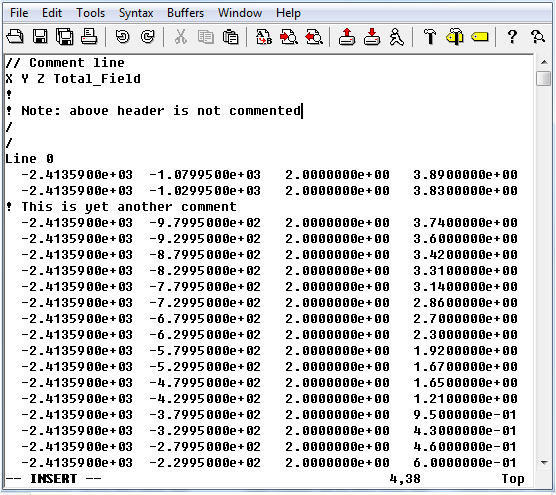
1. Sample of an XYZ file.
File Opening Mode
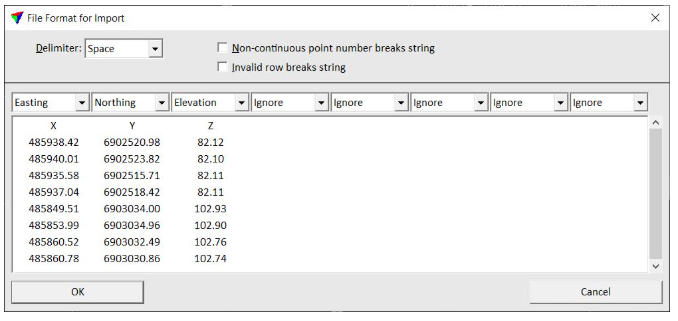
1. Import an XYZ file.
Related GIS files
References
- https://en.wikipedia.org/wiki/Digital_elevation_model
- https://en.wikipedia.org/wiki/Cartesian_coordinate_system
- https://support.esri.com/en-us/gis-dictionary/x-y-z-coordinates