Service

GeoServer REST API
Feb 11,2026
GISBox is a one-stop 3D GIS data editing, conversion and publishing platform that supports editing in multiple GIS formats such as OSGB/GEOTIFF/RVT, converting to 3DTiles/Terrain and publishing.
Introduction
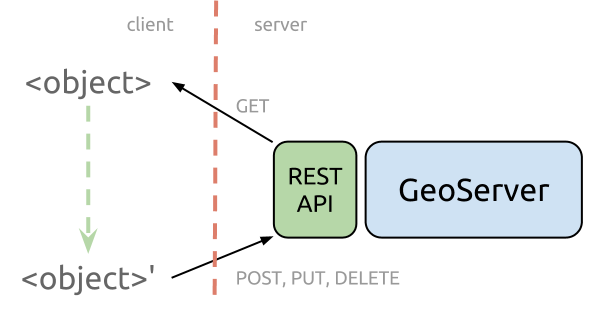
GeoServer REST API is a comprehensive programmatic interface for configuring and managing the GeoServer open-source geospatial data server. As an integral component of the GeoServer software suite, the API provides a standardized HTTP-based mechanism to automate and control virtually all administrative and data publishing tasks within a GeoServer instance. It enables developers, system administrators, and GIS professionals to interact with GeoServer programmatically—creating workspaces, adding data stores, publishing layers, configuring styles (SLD), managing security, and adjusting service settings (WMS, WFS, WCS) without using the web administration interface. This API is essential for integrating GeoServer into automated DevOps pipelines, multi-instance deployments, and custom geospatial application backends.
File Structure
The GeoServer REST API follows a resource-oriented architectural style, organizing its endpoints hierarchically to mirror the internal structure of GeoServer's configuration.
- Resource Hierarchy: The API is structured around core resources like /workspaces, /datastores, /layers, /styles, and /services. Each resource supports standard HTTP methods (GET, POST, PUT, DELETE) for CRUD operations.
- Data Format: Primarily uses XML and JSON for request and response payloads. Configuration is typically sent and received in well-defined XML schema formats (e.g., layer.xml, featureType.xml).
- Endpoint Organization: Configuration Endpoints: Manage global settings, contact information, and logging (/settings, /about/version).Data Management Endpoints: Handle workspaces (/workspaces/{workspace}), data stores (/workspaces/{workspace}/datastores/{datastore}), and published layers/coverages (/layers/{layer}).Styling Endpoints: Manage Style Layer Descriptors - SLD (/styles), including upload of .sld files and association with layers.Service Endpoints: Configure OGC service parameters for WMS, WFS, WCS (/services/wms, /services/wfs/, etc.).
- Security Integration: Includes endpoints under /security for managing users, roles, and layer-level access rules, supporting integration with external authentication systems.
Pros
- Full Automation of Server Management: Enables complete scripting of GeoServer setup, configuration, and maintenance, which is crucial for reproducible deployments, scaling, and Infrastructure as Code (IaC) practices in cloud environments.
- Deep Integration and Customization Capability: Allows seamless integration of GeoServer into larger geospatial platforms, custom administrative dashboards, or automated data publishing workflows, far beyond what the standard GUI offers.
- Efficiency in Repetitive and Bulk Operations: Dramatically improves efficiency when creating numerous similar layers, updating styles across multiple datasets, or performing batch updates to service configurations, saving significant manual effort.
- Consistency and Version Control: Server configurations can be defined as code (XML/JSON), stored in version control systems (like Git), tracked for changes, and deployed consistently across development, staging, and production environments.
Cons
- Steep Learning Curve and Complexity: The API's extensive scope and the necessity to understand GeoServer's internal XML configuration schemas present a significant barrier to entry for beginners or those unfamiliar with RESTful design and geospatial concepts.
- Sparse Error Messaging and Debugging Difficulty: Error responses can sometimes be generic or unhelpful, making it challenging to diagnose the root cause of failed POST or PUT requests, especially during complex configuration updates.
- Version Dependency and Backward Compatibility: The API and its data structures may change between major GeoServer versions. Scripts and tools built for one version might require modification to work with another, posing maintenance challenges.
- Lack of Official High-Level Client Libraries: While community libraries exist (e.g., for Python, Java), there is no officially maintained, feature-complete SDK. Users often need to construct raw HTTP requests, increasing development overhead.
Application Scenario
The core application scenario of the GeoServer REST API is to enable automated, programmable, and scalable operational management of geospatial data servers. It is widely used in cloud-native architecture and DevOps workflows for automated GeoServer deployment and configuration, allowing scripts to automatically create data stores, publish layers, and configure services during container startup, ensuring environment consistency. In dynamic data update scenarios, the API supports the automated publishing of streaming data sources—such as satellite imagery and IoT sensor data—into real-time OGC services (WMS, WFS), enabling end‑to‑end automation pipelines from data to map services. Furthermore, the API is utilized to build multi‑tenant geospatial platforms, programmatically creating workspaces, setting access permissions for different clients or departments in batches, and supporting configuration synchronization and version control across multiple GeoServer instances. This transforms GeoServer from a manually managed graphical interface tool into an integrable, orchestrate‑able core component of enterprise‑level geospatial service infrastructure.
Example
1. GeoServer REST API.